Julia's Reruns Bot @b0rk_reruns@social.jvns.ca · activity timestamp 2 hr. ago /procPermalink: https://wizardzines.com/comics/proc Read more Read less Translate Translate alt ### panel 1: Every process on Linux has a PID (process ID) like 42. In /proc/42, there's a lot of VERY USEFUL information about process 42. ### panel 2: /proc/PID/cmdline command line arguments the process was started with. ### panel 3: /proc/PID/environ all of the process's environment variables ### panel 4: /proc/PID lexe Symlink to the process's binary magic: works even if the binary has been deleted! ### panel 5: /proc/PID/status Is the program running or asleep? How much memory is it using? And much more! ### panel 6: /proc/PID/fd Directory with every file the process has open! Run ```$1s-1 /proc/42/fd``` to see the list of files for process 42. These symlinks are also magic & you can use them to recover deleted files ### panel 7: /proc/PID/stack The kernel's current stack for the process. Useful if it's stuck in a system call. ### panel 8: /proc/PID/maps List of process's memory maps. Shared libraries, heap, anonymous maps, etc. ### panel 9: and more Look at ```man proc``` for more information! ### panel 1: Every process on Linux has a PID (process ID) like 42. In /proc/42, there's a lot of VERY USEFUL information about process 42. ### panel 2: /proc/PID/cmdline command line arguments the process was started with. ### panel 3: /proc/PID/environ all of the process's environment variables ### panel 4: /proc/PID lexe Symlink to the process's binary magic: works even if the binary has been deleted! ### panel 5: /proc/PID/status Is the program running or asleep? How much memory is it using? And much more! ### panel 6: /proc/PID/fd Directory with every file the process has open! Run ```$1s-1 /proc/42/fd``` to see the list of files for process 42. These symlinks are also magic & you can use them to recover deleted files ### panel 7: /proc/PID/stack The kernel's current stack for the process. Useful if it's stuck in a system call. ### panel 8: /proc/PID/maps List of process's memory maps. Shared libraries, heap, anonymous maps, etc. ### panel 9: and more Look at ```man proc``` for more information! wizard zines /proc Reply Boost Quote Like More actions Copy link Share Flag this post Block
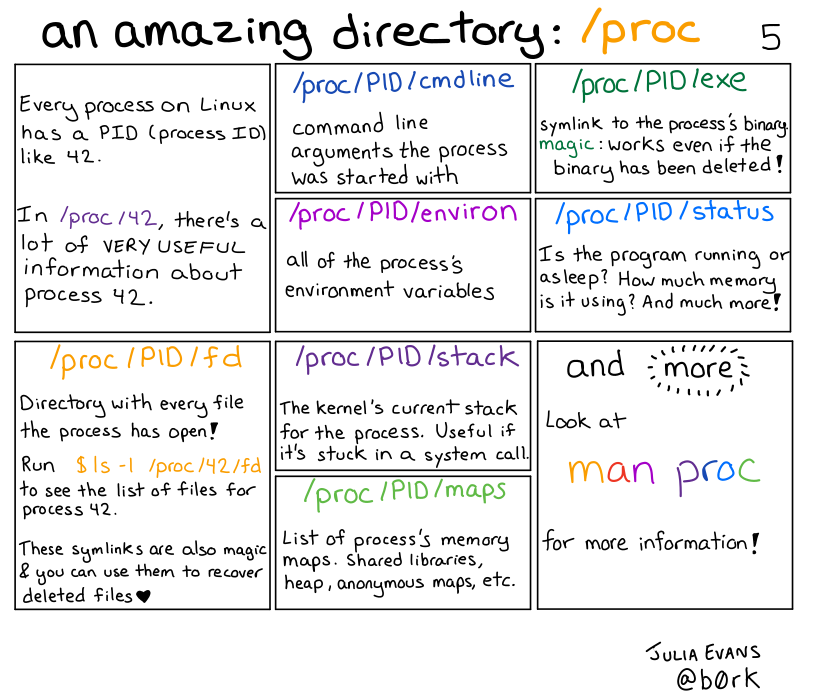
alt ### panel 1: Every process on Linux has a PID (process ID) like 42. In /proc/42, there's a lot of VERY USEFUL information about process 42. ### panel 2: /proc/PID/cmdline command line arguments the process was started with. ### panel 3: /proc/PID/environ all of the process's environment variables ### panel 4: /proc/PID lexe Symlink to the process's binary magic: works even if the binary has been deleted! ### panel 5: /proc/PID/status Is the program running or asleep? How much memory is it using? And much more! ### panel 6: /proc/PID/fd Directory with every file the process has open! Run ```$1s-1 /proc/42/fd``` to see the list of files for process 42. These symlinks are also magic & you can use them to recover deleted files ### panel 7: /proc/PID/stack The kernel's current stack for the process. Useful if it's stuck in a system call. ### panel 8: /proc/PID/maps List of process's memory maps. Shared libraries, heap, anonymous maps, etc. ### panel 9: and more Look at ```man proc``` for more information! ### panel 1: Every process on Linux has a PID (process ID) like 42. In /proc/42, there's a lot of VERY USEFUL information about process 42. ### panel 2: /proc/PID/cmdline command line arguments the process was started with. ### panel 3: /proc/PID/environ all of the process's environment variables ### panel 4: /proc/PID lexe Symlink to the process's binary magic: works even if the binary has been deleted! ### panel 5: /proc/PID/status Is the program running or asleep? How much memory is it using? And much more! ### panel 6: /proc/PID/fd Directory with every file the process has open! Run ```$1s-1 /proc/42/fd``` to see the list of files for process 42. These symlinks are also magic & you can use them to recover deleted files ### panel 7: /proc/PID/stack The kernel's current stack for the process. Useful if it's stuck in a system call. ### panel 8: /proc/PID/maps List of process's memory maps. Shared libraries, heap, anonymous maps, etc. ### panel 9: and more Look at ```man proc``` for more information!