

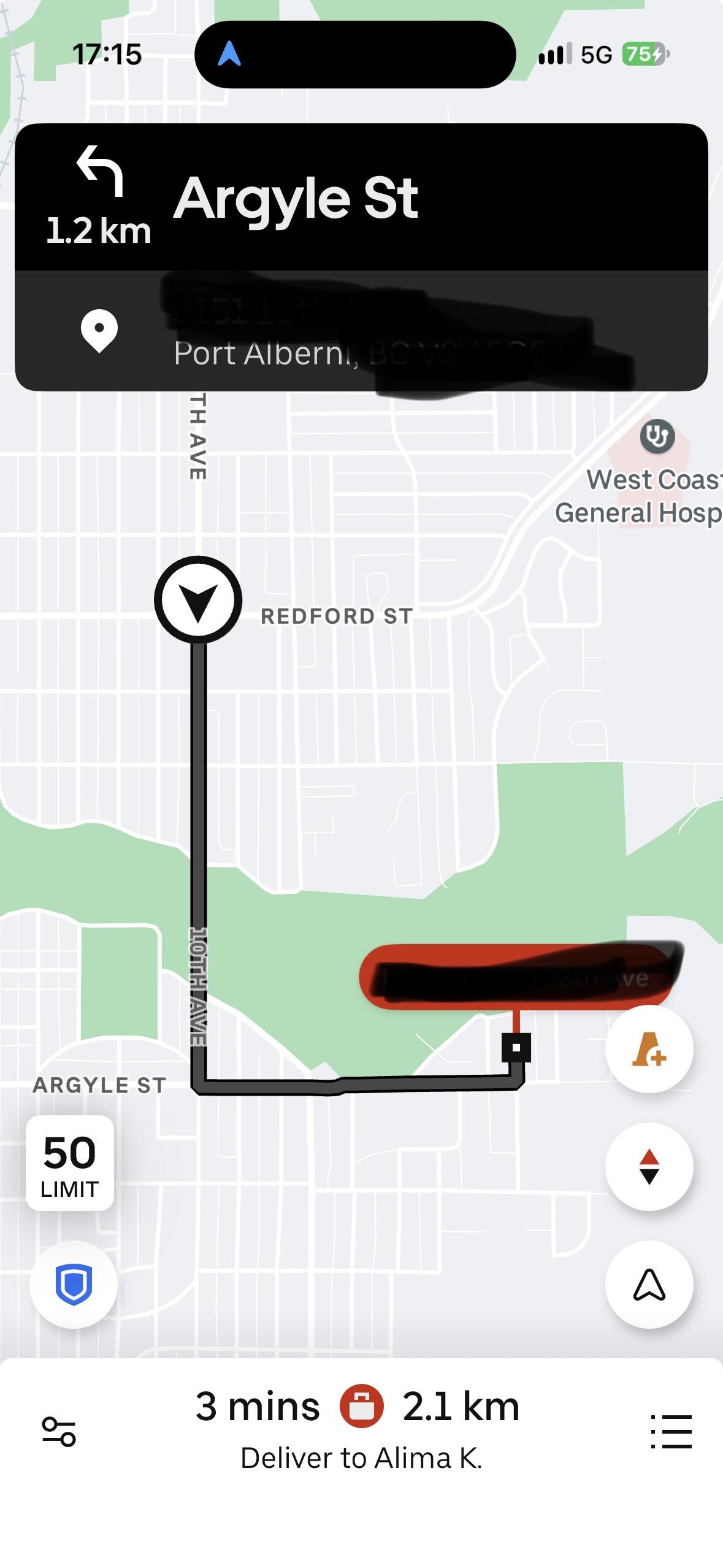
am I crazy to think that having a map be opposite of the directions of the top of the screen is unnecessarily confusing?
0 Boosts
0 Likes
@zazzoo ya! north up. doesnt seem to be a way to change it! have looked a million times!


@chris yes, looks like map is north up rather than direction of travel. That would mess me up. I like having the map follow my perspective


Do you have up... to be North?
I found not using that setting to be very confusing, as the drive progressed through many turns.


@chris You need a map to find your way around the tiny village of Port Alberni ? 😉
Personally , I prefer consistency in map orientation vs one that rotates as you do. "Take left turn at next intersection" does not need to have map change orientation. But then again, I am one who tends to plan trips in advance so I already have pretty good situational awareness of where I should be.
@chris Took me a while to "get" your map. But that is because until I look at it in Google map to get "bigger picture" to locate 10th and Arguyle, I couldn't tell the map on your phone is north up. (which is the logically correct way).
Howver, in my head's faulty memory, I have "placed" alberni with water at bottom and mountains the top (east up). (from my trips there in '83 and '85)
Now, I am curious if I can find the municipal campground I stayed at both times.

@chris Isn't that just north = up? Usually there's an option in map apps to be north-up or rotate.