

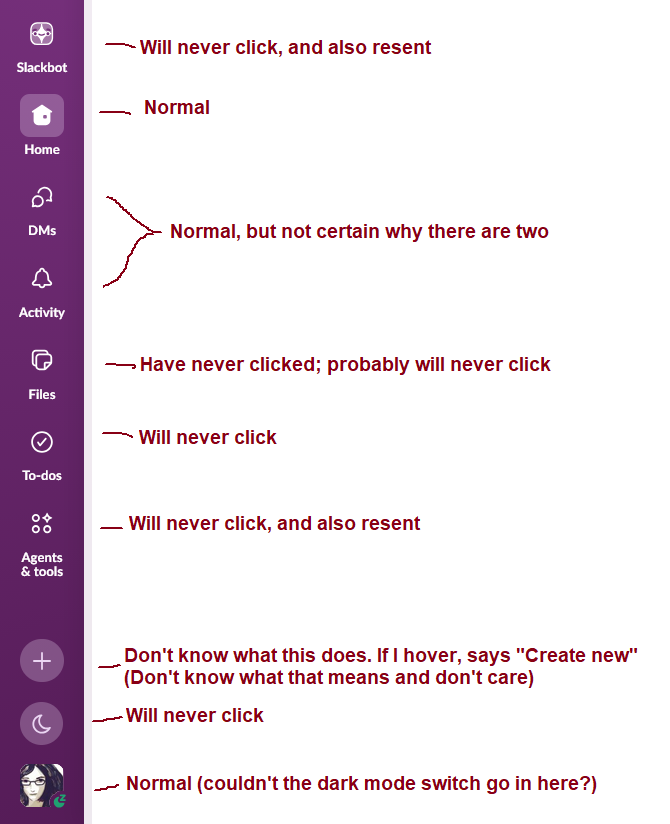
Looking over the Slack side bar and realizing it is at 3/10 "buttons that are there for me" and 7/10 "buttons that are there to make a product manager happy"
9 Boosts
1 Like


@mcc curiously similar here: only use home, threads, and the settings (set status to out-of-office or so). (I find the DM access in the DM menu confusing and prefer how they're arranged in home).
I'm wondering if I'm not okay with the buttons. It's not like they are distracting animated GIFs (like notion's version of clippy). And the vertical strip will still be there even if you remove all the unused buttons. (Requires using often enough that you don't need to search your buttons every time)
@pseyfert i feel like they could just remove the button row and build this into the row of channels

@mcc I’ve given up on using the app version (except when I have to join a huddle) and use the web version with custom CSS to remove the Slackbot button (among other things).
https://gist.github.com/mattslack/fcd2a81a598d052349457140c558dac0

@mcc and almost every week they change something which is super annoying. The last I remember was moving the saved items and forcing now to use a todo thing. Ridiculous. Always adding more buttons or chaos.

@mcc Meanwhile in Zoom
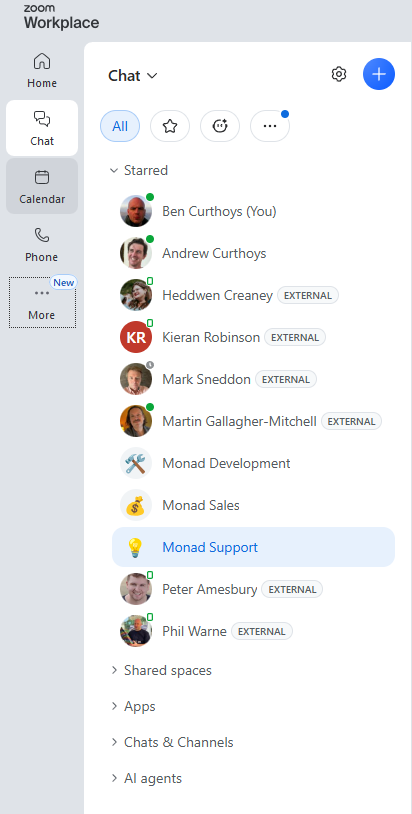


@bencurthoys @mcc I've got the defaults in Zoom, and I've outlined in red the stuff I ever care about…



@mcc Teams: hold my goddamn beer
Note: It has now been explained to me that you can, in fact, turn off any or all of these buttons, EXCEPT "Slackbot", the single button I most want to turn off. If a project management genie told me "you can disable exactly one button in the Slack sidebar" I'd say Slackbot without hesitation. "Agents and Tools" is also undesirable because it *can* be used to launch Slackbot, but it would require two clicks instead of one, so that is less dangerous

@mcc they'll let you move the Slackbot button down so it's not at the top of the list, but not hide it entirely. It's offensive.


@mcc Slackbot was clearly placed at the top so that you click on it when you meant to click Home.
Wait. **What**
https://mas.to/@akos/117610340601103610
EDIT: To be clear I am not saying this is a bad feature or even a bad feature to have toplevel but why does it use the icon other apps use for dark mode
EDIT 2: OF COURSE. OF COURSE THE REASON A UI DOESN'T MAKE SENSE ON MY WINDOWS/LINUX MACHINE IS BECAUSE IT'S COPYING APPLE
This is my response to everyone who replied to this thread saying "I use the TO-DO section in Slack"



@mcc That's a lot less judgy than I would be :D
I have strong feelings about any ToDo list that comes with a privacy policy
@mcc apple uses this icon for Do Not Disturb and I believe it predates dark mode



@mcc Apple does this too, "Do Not Disturb" is the same crescent moon.


@mcc when this feature popped up, I immediately filled out a feedback form. They told me that it was an experimental feature that would give me the ability to turn it off once I sent 10 messages to the chatbot.
I told the bot to fuck itself 10 times (you have to wait for it to respond, tho) and yet it remained with no option to disable. I checked a week later and the option was there and I was able to yeet the bot from the bar.
@zkamvar That's fascinating but one of the problems with AI is I can't even malicious-compliance it because my objection is the ecological impact and that occurs even when I do it ironically


@mcc "AI" software features would be far less suspicious if they weren't uniformly pushed via hostile UX decisions

@mcc sometimes when I'm feeling particularly petty I go in with the web inspector and delete these nodes manually
they come back when I refresh of course, but it still feels good
edit: I just realized I'm an idiot and I can ublock origin these to hell and they will actually stay gone
@technomancy Custom CSS that can selectively kill elements of a webpage would be one of the best innovations of the web if it weren't that it only became useful at the same time we introduced a web programming idiom where every CSS class is named .a-b2342-j34a34r5 and the class name changes biweekly
@mcc @technomancy it’s good that it happened concurrently with CSS getting more powerful so you can basically always still select it with semantically meaningful things, but it’s annoying that they’re harder to figure out

@mcc @technomancy :first-of-kind selector to the rescue?

@mcc So, massively better than Teams :)
@joergrings One time, I tried to launch Teams. I failed. I literally could not get it to run on my computer
@mcc I should be so lucky
@mcc
I tend to ignore the settings and about me pages in any social media. They aren't very friendly.

@mcc "Create new" lets you start a new conversation, no?
The moon button isn't to flag yourself as unavailable?
Did you try them out?
I'd put decent odds on slack not even having a product manager in the traditional sense. My guess is that everything ends up in a list of tickets on a backlog and developers pull out what sounds like it would be simple enough. The AI crap probably got pushed from above, but that's it. The rest random user requests and "low hanging fruit".

@mcc This is true in pretty much all commercial software!
The whole structure of how such software is created: team - team lead - project manager - product manager - area manager - vice president - CTO - CEO — this whole structure leads to crap.
(See Conway's Law - he had no idea how bad it would become!)


@mcc I actually wanted to use Slackbot yesterday, but couldn’t figure out how to get to it. My brain has so completely blocked that button I couldn’t see it.

@mcc I get Home, DMs, Activity, Files, To-Dos, "More ..." and Admin. The reason I get "More ..." is because I went into Preferences -> Navigation and turned off "Agents & Tools" so maybe that's an option for you too? You'd still have a "More ..." you'll never click but that's now just one thing.
Also that's not Dark Mode, that's "Focus Mode," which is different and weird. It's a sort of minimal distractions mode.

@mcc You can disable some buttons in the settings, but for some reason some of the checkboxes are grayed out including Slackbot (we know the reason). You can also reorder them so I move Slackbot lower so I don't click it by mistake.


@mcc todo is a weird name, but i love the "remind me about this" feature (at least until the moment i get that reminder 😝)

@mcc that us very much an issue with so much MS software.