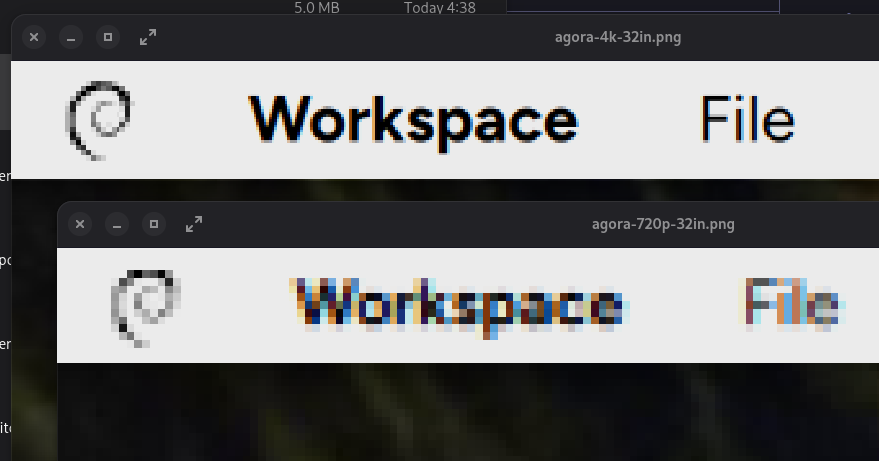
Resolution independence: the same desktop, rendered on a simulated 27" screen, in 4K and 720p. Plus a zoomed-in comparison shot showing the pixels up close and personal.
In Agora, more resolution means things get sharper, not smaller.
Discussion
Resolution independence: the same desktop, rendered on a simulated 27" screen, in 4K and 720p. Plus a zoomed-in comparison shot showing the pixels up close and personal.
In Agora, more resolution means things get sharper, not smaller.
@mos_8502 how does this handle elements that have to be pixel-precise? like, if there's a nice light gray skeuomorphic button that is set to have black text and a white inset copy of that text 1px above it at 720p, or a checkbox with a 1px thick border, how do you make it so that it doesn't turn into a blurry 1.5px at 1080p?
@rnd All UI elements are drawn with vectors; a skeuomorph would require using bitmaps for pixel precision.
@mos_8502 i understand that it's drawn with vectors, i'm just trying to figure out if you have something in mind to avoid the side effects of non-integer scaling
like, here i drew some basic shapes in Inkscape, aligning them to a 92dpi pixel grid. they look really good on 100% and 200% scales, but end up a bit blurrier and more degraded on a 150% scale (and any scale in between, like 125% or 133%, would have the same side effects)
ideally, there'd be something similar to a font hinting engine that would look at the shapes in a vector figure and find ways to align them to stay pixel-sharp, but it's a complicated enough thing with fonts, which only have single unlayered one-color shapes to take care of
ideally, there'd be something similar to a font hinting engine that would look at the shapes in a vector figure and find ways to align them to stay pixel-sharp
Oh! The engine is smart enough to try to draw on pixel boundaries (since it's aware of the actual device DPI) rather than allow aliasing where it can be avoided. There's not much can be done to avoid aliasing of fonts on low-res displays, but you shouldn't see any of the blurry bits in the UI on any reasonable display.
This is real fractional scaling at the point of drawing, not an integer 1x/2x choice you make. It detects the monitor's physical size, and adjusts drawing accordingly. 72pt text is one inch fucking tall, no matter what screen you're using.